
Integrations
Bring your business data into the conversation.
Connect supported databases, upload files, or sync data through an available connector. Then use that data for analysis, reports, and dashboards.
 SQL Server
 PostgreSQL
 MySQL
MySQL Oracle◎Odoo▦CSV / Excel
How it helps
Connect SQL Server, Azure SQL, PostgreSQL, MySQL, MariaDB, Oracle, or SQLite, or upload a CSV or Excel file. Snowflake, Redshift, and BigQuery are enabled per deployment after a check with your source. Business apps with an MCP server, such as Stripe, Jira, and Notion, connect through the MCP Marketplace. Odoo has dedicated integration support. Other systems can use a supported database, export, or an integration configured for the source.
Who this is for
- ERP and finance teams on Odoo
- Banks and core systems teams
- SaaS product owners embedding analytics
- Data teams connecting operational sources
Three integration paths
Choose how to connect your data.
ETL connectors
Sync source systems into a landing database, then publish datasets and dashboards.
Data connections
Query SQL Server, Azure SQL, PostgreSQL, MySQL, Oracle, and warehouses under tenant governance.
Host embeds
Reports and dashboards inside the host app, with short-lived tokens and SSO-aware tenancy.
Odoo
Analyze Odoo data and view reports inside Odoo.
01
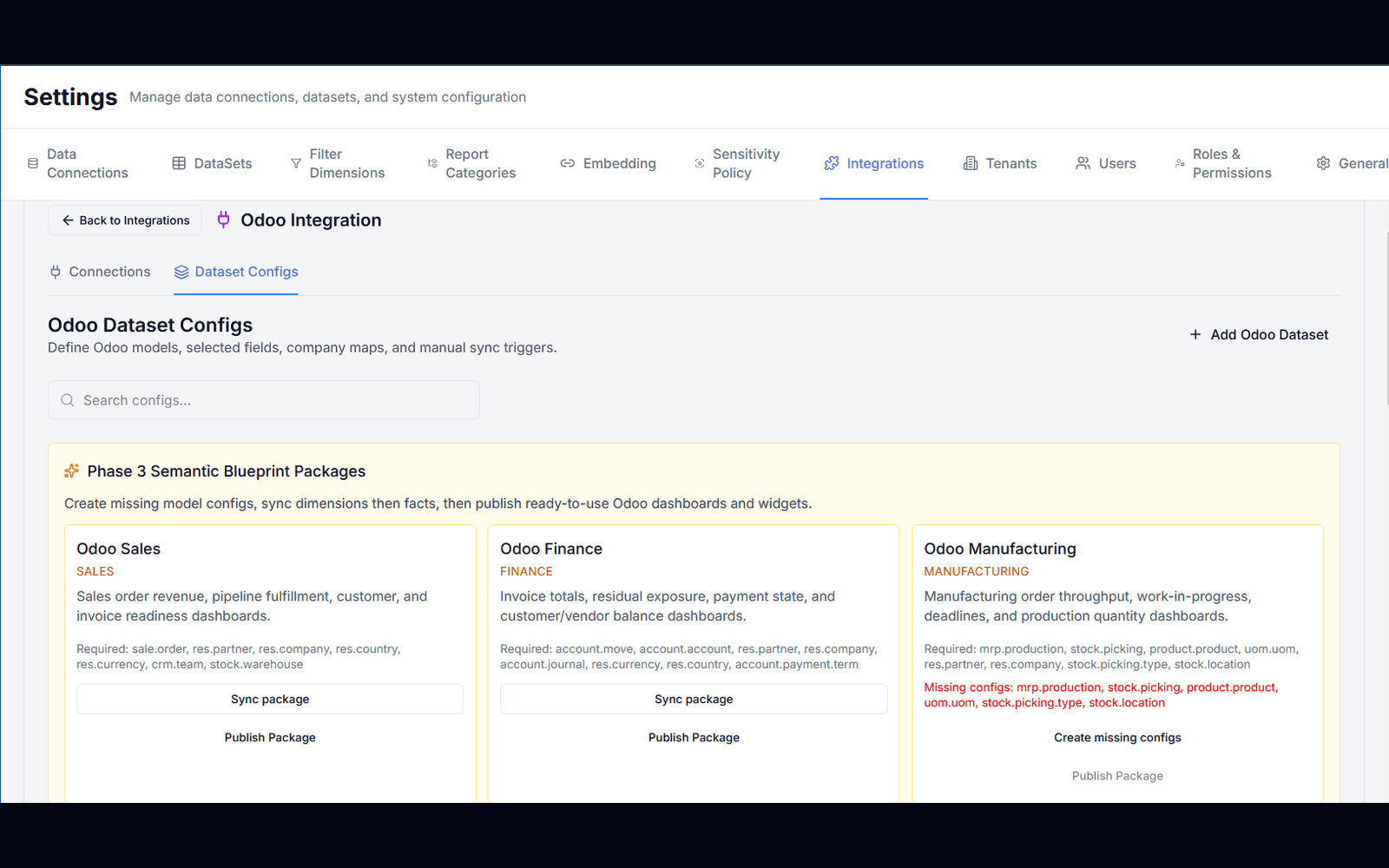
Choose Odoo data and reporting templates
Define Odoo models, fields, and company maps, then publish ready-to-use dashboards.
- ✓Dataset configs per Odoo model
- ✓Semantic blueprint packages (Sales, Finance, Manufacturing)
- ✓Sync dimensions and facts, then publish analytics content
02
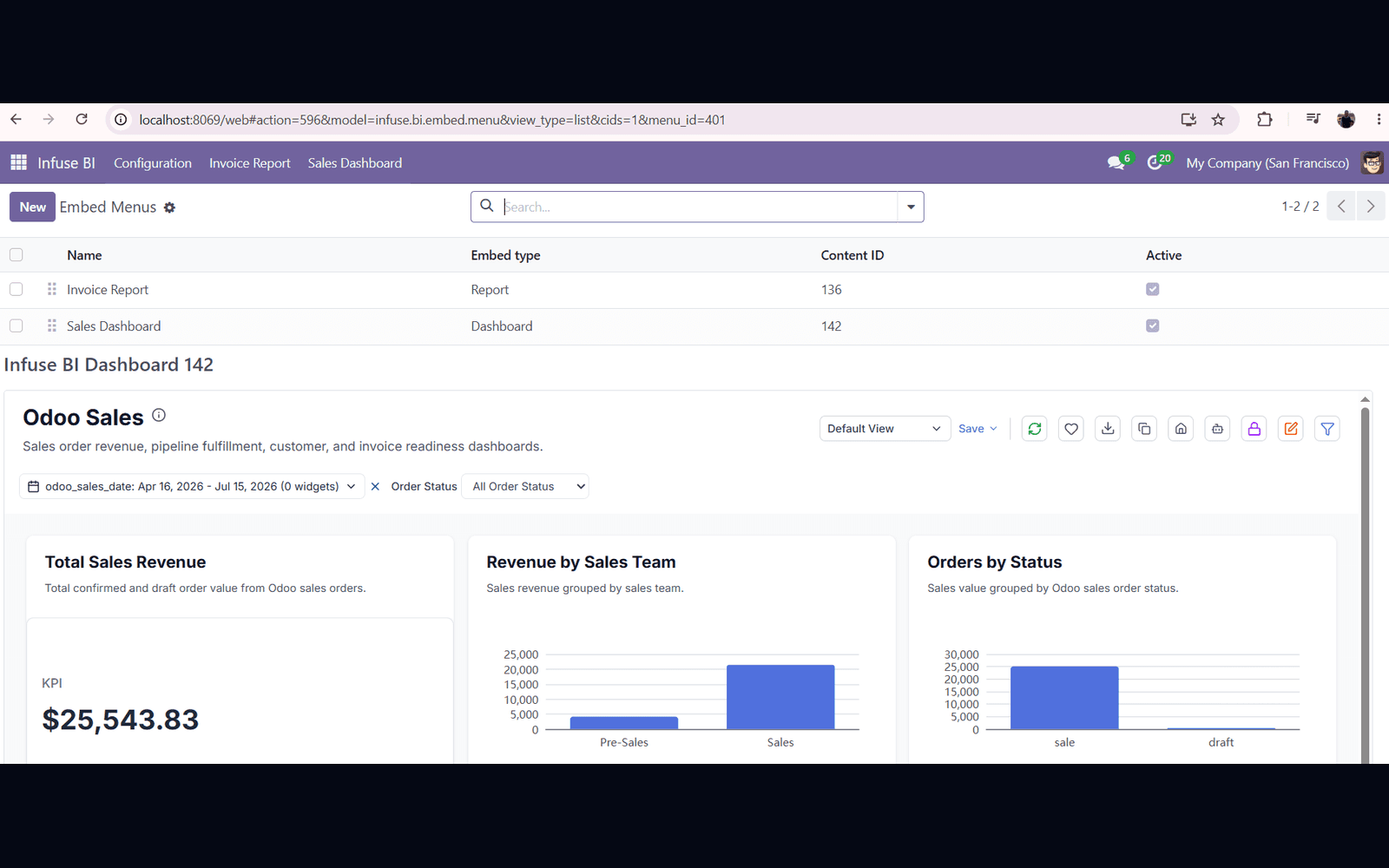
Embed InfuseBI inside Odoo
InfuseBI menus in Odoo open live dashboards in-product — native host navigation.
- ✓Embed menus for dashboards and reports
- ✓Tenant-scoped, white-label ready views
- ✓Users stay in Odoo while analyzing live data
Connection options
Choose a connection that fits your system.
Odoo
ETL sync, blueprint packages, and embed menus — the full path today.
Temenos & core banking
Connect core banking warehouses via SQL/Oracle, then embed analytics in banking portals.
Accounting and SaaS data
Use a supported export or database, or discuss a dedicated integration. Source-specific access and setup need to be confirmed.


Business apps through MCP
Stripe, PayPal, Jira, Notion, Linear, and other apps with an MCP server connect from the MCP Marketplace: sign in, pick the data, done.
Compare →Other popular SaaS
Use an available connector, upload an export, or place source data in a supported database.






Databases & warehouses
SQL Server, Azure SQL, PostgreSQL, MySQL, MariaDB, Oracle, SQLite, Snowflake, Redshift, and BigQuery.

dbt
InfuseBI works with your dbt models alongside Snowflake, BigQuery, and other supported warehouses.
Any embeddable host
The embed SDK places InfuseBI inside custom portals and internal apps.
ETL as a platform feature
Keep connected data ready for analysis.
Configure a supported connector to sync source data, map the correct company or customer, and make datasets available for reporting.
- ✓Source sync into a dedicated landing store
- ✓Company / tenant mapping for multi-entity deployments
- ✓Provisioned datasets with semantic metadata for charts and AI
- ✓Reusable packages so Sales, Finance, and operations start faster
How it works
From source system to in-product analytics.
Connect or sync
Add a data connection, or configure an ETL connector for the source system.
Model and govern
Build datasets with AI or SQL, apply tenant and row filters, and approve AI eligibility.
Embed or share
Deliver dashboards in the host app, a customer portal, or scheduled Excel/PDF exports.
Ready when you are
Bring your toughest question.
See how your AI data team turns it into findings, dashboards, and data your team can use.
FAQ
Frequently asked questions
How does InfuseBI integrate with Odoo?+
Two complementary paths: an ETL connector syncs Odoo models into landing datasets and blueprint packages, and an Odoo host addon embeds InfuseBI dashboards and reports inside Odoo menus with short-lived tokens.
Can InfuseBI connect to Temenos or core banking systems?+
A core banking system can provide data through a supported SQL or Oracle database, a prepared export, or an integration built for the source. Confirm access, available fields, and refresh needs with your system team; this is not a claim of a ready-made Temenos connector.
Does InfuseBI support QuickBooks and other SaaS apps?+
Apps with an MCP server connect from the MCP Marketplace. Stripe, PayPal, Jira, Notion, Linear, and many others take one step, and any other MCP app connects by its address. For apps without MCP, use a file export or database connection, or discuss a dedicated integration. Odoo has dedicated support.
What is the difference between ETL and embed?+
ETL moves and models operational data so InfuseBI can query it. Embed places InfuseBI UI inside another product. Many deployments use both — sync the data, then show dashboards where users already work.