
AI data modeling
Model your data with AI. No SQL needed.
Pick the tables you want to analyze. AI links them, names the fields, and suggests the measures. You review the model, and InfuseBI checks it before anyone uses it.
Does the answer make the next decision clearer?
Do the calculations and exports meet your needs?
Is the experience right for each audience?
How it helps
InfuseBI builds analytics-ready datasets with AI. Choose a database and the tables you need; AI proposes the joins, field names, and measures, and the dataset is checked for duplicate rows, missing links, and access rules before it is published. Existing SQL datasets can open as tables, failed checks can be fixed with AI, and updates to live datasets show which dashboards and reports are affected before they switch over.
Who this is for
- Business teams who need a dataset without writing SQL
- Analysts maintaining many reporting datasets
- Data teams who want changes reviewed before they go live
- SaaS teams preparing data for customer-facing analytics
How it works
From tables to a trusted dataset.
Pick your tables
Choose a connection, then the main table and the tables that describe it.
AI builds the model
Joins, friendly field names, dates, and suggested measures, drawn on a canvas you can edit.
Check and publish
Duplicate rows, broken links, and access rules are checked before the dataset goes live.
What you get
Everything a dataset needs, without the SQL.
01
Build with AI
Describe what you want to analyze, or pick the tables yourself. AI links them on the right keys and suggests the measures your team will ask about.
- ✓Joins proposed from keys and real data, not guesses
- ✓Friendly field names, dates, and default totals
- ✓Edit anything on the canvas before you publish
Sales, linked to the tables that describe it.
- SalesMain table · one row per order line
- CustomersLinked on CustomerId
- ProductsLinked on ProductId
- CalendarLinked on OrderDate
Suggested measures. Review the links and measures before you publish.
02
Fix with AI
If a check fails, ask AI to fix it. It repairs the model without adding tables or changing what one row means.
- ✓Plain-language reasons for every failed check
- ✓One click to propose a repair you can review
- ✓Repairs stay inside the model you approved
One check needs attention.
- Check
- Duplicate rows
- Why
- Returns has several rows per order
- Fix with AI
- Link Returns on order line, not order
- Result
- One row per order line again
Repairs never add tables or change what one row means.
03
Open existing SQL as tables
Already have hand-written SQL datasets? Open them as tables and keep improving them on the canvas, with the same fields your reports use today.
- ✓Recovers the tables and joins behind the query
- ✓Keeps every field your reports depend on
- ✓Explains in plain words when a query can't convert
- 1
Your SQL dataset
SELECT … FROM Sales JOIN Customers …
- 2
Opened as tables
Sales, Customers, and the link between them.
- 3
Same fields
Every field your reports use is kept.
04
Update live datasets safely
Change a dataset that dashboards already use. InfuseBI checks the new version, shows which dashboards and reports are affected, and only then switches over.
- ✓Impact review before anything changes
- ✓Switch-over without a broken dashboard in between
- ✓Version history with one-click restore
3 items use this dataset.
- Regional sales dashboardKeeps working
- Monthly margin reportUses a renamed field
- Copilot answersReady after refresh
Works where your data lives
One way to model, across your databases.
Build with AI works on every database InfuseBI connects to. Cloud warehouses are switched on for your deployment after a check against your own data.


SQL Server and Azure SQL
Tables, views, and stored procedures.

Oracle
Schemas, tables, and views.

PostgreSQL
Including managed cloud PostgreSQL.


MySQL and MariaDB
Self-hosted or managed.



Snowflake, Redshift, and BigQuery
Cloud warehouses, enabled after a check with your source.

SQLite and files
Upload a SQLite database, CSV, or Excel file.
One editor
Every dataset in one simple editor.
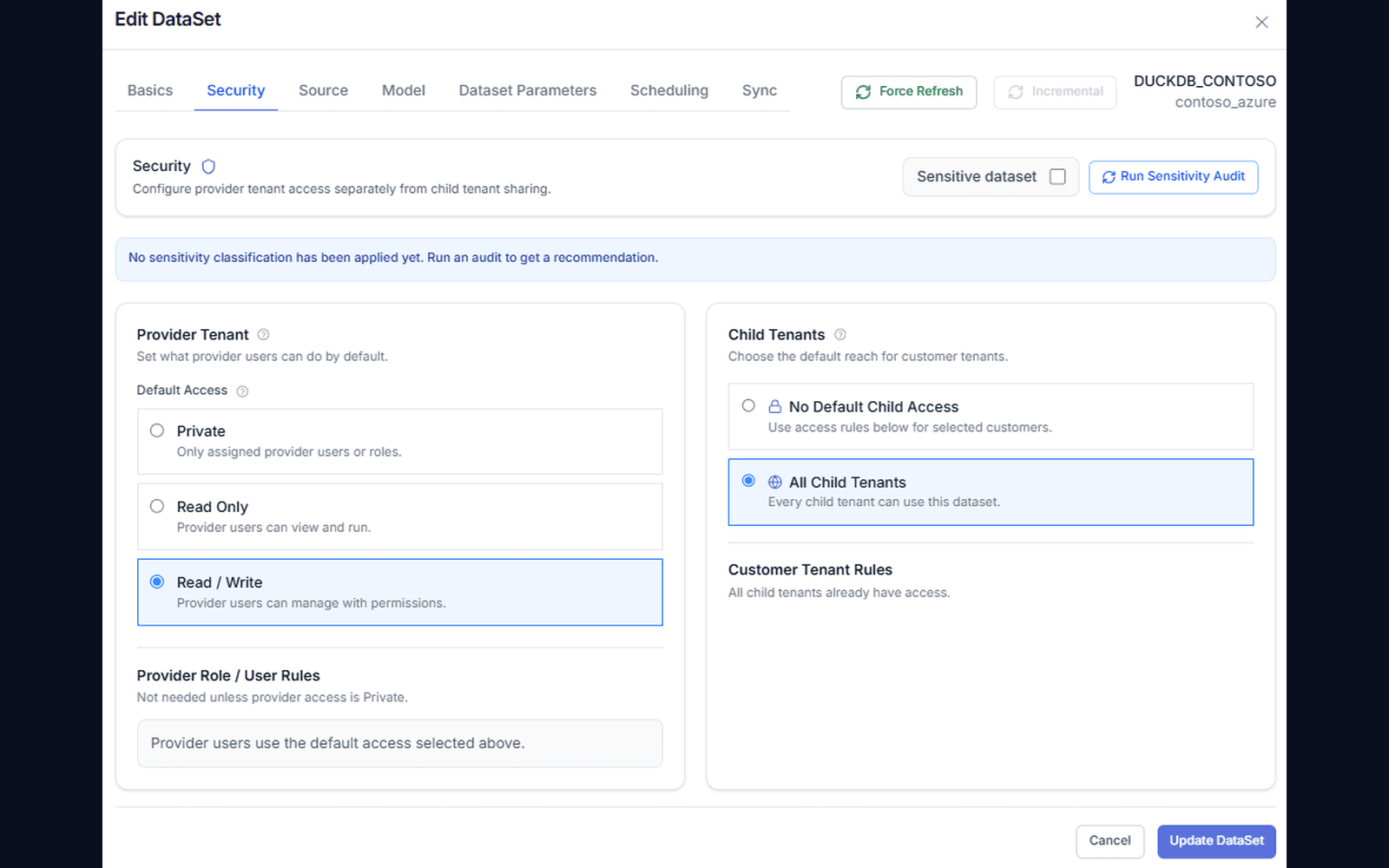
Fields, filters, row access, refresh, Copilot settings, and history live in one place. Small changes save as you go; data changes are checked before they publish.
- ✓Rename fields and set formats as you go
- ✓Row access by customer, region, or user
- ✓Full or incremental refresh on a schedule
- ✓Live query or a saved copy, switchable any time
Ready for AI answers
Datasets your AI data team understands.
The model AI builds is the model Copilot reads. Measures, dates, and field meanings carry straight into AI answers, charts, and dashboards.
Measures that add up
Totals, counts, and averages are defined once, so AI answers match your reports.
Field meanings included
Descriptions and synonyms help AI pick the right field.
Sensitive fields kept out
Mark a field sensitive and AI never sees it.
Ready when you are
Bring your toughest question.
See how your AI data team turns it into findings, dashboards, and data your team can use.
FAQ
Frequently asked questions
Do I need to know SQL to build a dataset?+
No. Pick a database and the tables you need, or describe what you want to analyze. AI proposes the joins, field names, and measures, and you review them on a canvas. Teams that prefer SQL can still write it or open existing SQL as tables.
Which databases does AI data modeling support?+
SQL Server, Azure SQL, Oracle, PostgreSQL, MySQL, MariaDB, and SQLite, plus Snowflake, Amazon Redshift, and Google BigQuery. Cloud warehouses are enabled for a deployment after a check against your own source. CSV and Excel uploads are also supported.
How does InfuseBI stop a bad model from reaching reports?+
Every model is checked before it publishes: duplicate rows after a join, missing links, grain, and access rules. Failed checks are explained in plain language, and Fix with AI can propose a repair that never adds tables or changes what one row means.
What happens when I change a dataset that dashboards already use?+
InfuseBI builds and checks the new version privately, then shows which dashboards, reports, and widgets are affected. After you confirm, it switches over in one step. Every version is kept in history and can be restored.
Can AI see all of my data while modeling?+
AI works from table and column structure plus small profiles of the data. Your connection permissions apply, and fields marked sensitive are excluded from AI answers.